
Loose Fuel Cap warning message
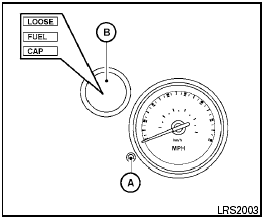
Loose Fuel Cap warning message
The LOOSE FUEL CAP warning message displays in the odometer when the fuel-filler cap is not tightened correctly after the vehicle has been refueled. It may take a few driving trips for the message to be displayed. To turn off the warning message, perform the following.
1. Remove and install the fuel-filler cap as previously described as soon as possible.
2. Tighten the fuel-filler cap until it clicks.
3. Press the loose fuel cap warning reset button A in the meter for about 1 second to turn off the LOOSE FUEL CAP warning message B after tightening the fuel-filler cap.
See also:
BluetoothT Hands-Free Phone System without Navigation System (if so
equipped)
WARNING:
- Use a phone after stopping your vehicle
in a safe location. If you have to use a
phone while driving, exercise extreme
caution at all times so full attention may
be given to vehicl ...
Tire rotation
NISSAN recommends rotating the tires
every 7,500 miles (12,000 km).
See “Flat tire” in the “In case of emergency”
section of this manual for tire replacing
procedures.
As soon as possib ...
Automatic operation
Cooling and/or dehumidified heating (AUTO)
This mode may be used all year round as the
system automatically works to keep a constant
temperature. Air flow distribution and fan speed
are also co ...