
Backing up on a steep uphill
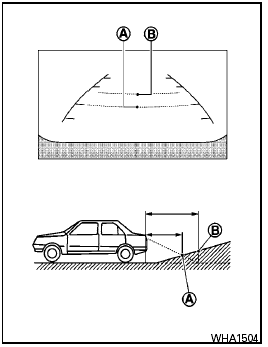
Backing up on a steep uphill
When backing up the vehicle up a hill, the distance guide lines and the vehicle width guide lines are shown closer than the actual distance.
For example, the display shows 3 ft (1.0 m) to the place A , but the actual 3 ft (1.0 m) distance on the hill is the place B . Note that any object on the hill is further than it appears on the monitor.
See also:
On-pavement and off-road driving precautions
Utility vehicles have a significantly higher
rollover rate than other types of vehicles.
They have higher ground clearance than passenger
cars to make them capable of performing
in a variety of ...
Passenger compartment
CAUTION
Never use a fuse of a higher or lower
amperage rating than specified on the
fuse box cover. This could damage the
electrical system or cause a fire.
If any electrical equipment does not ...
Jacking up vehicle and removing the damaged tire
Jacking up vehicle and removing the damaged tire
● Never get under the vehicle while it is
supported only by the jack. If it is necessary
to work under the vehicle, support
it with ...