
Backing up behind a projecting object
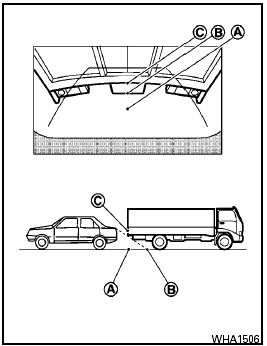
Backing up behind a projecting object
The position is shown farther than the position B in the display. However, the position C is actually at the same distance as the position A .
The vehicle may hit the object when backing up to the position A if the object projects over the actual backing up course.
See also:
Anti-freeze
In the winter when it is anticipated that the
outside temperature will drop below 328F (08C),
check the anti-freeze to assure proper winter
protection. For additional information, see “Engine ...
Precautions on supplemental restraint system
This Supplemental Restraint System (SRS) section
contains important information concerning
the following systems:
- Driver and passenger supplemental frontimpact
air bag (NISSAN Advanced Air Ba ...
Front power seat adjustment
Operating tips:
- The seat motor has an auto-reset overload
protection circuit. If the motor stops during
operation, wait for a while, then reactivate
the switch.
- Do not operate the power se ...