
Vents
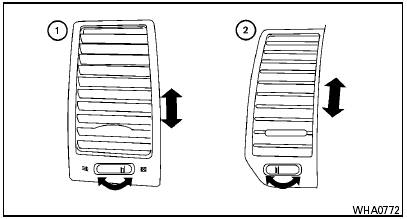
Adjust air flow direction for the driver’s and passenger’s side 1 , and center 2 ventilators by moving the ventilator slide and/or ventilator assemblies.
Open or close the ventilators 1 by using the dial.
Move the dial toward the  to open
the ventilators
or toward the
to open
the ventilators
or toward the  to close them.
See also:
Using the system
Depress the brake pedal and hold it down. Depress
the brake pedal with firm steady pressure,
but do not pump the brakes. The ABS will operate
to prevent the wheels from locking up. Steer
the vehic ...
Jump starting
If jump starting is necessary, see “Jump starting”
in the “In case of emergency” section of this
manual. If the engine does not start by jump
starting, the battery may have to be replace ...
Towing load/specification
*1: The towing capacity values are calculated
assuming a base vehicle with driver and any
options required to achieve the rating. Additional
passengers, cargo and/or optional equipment
will ...