
FM/AM radio with compact disc (CD) player (Type B) (if so equipped)
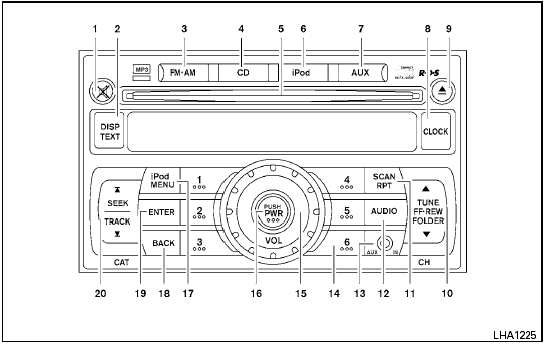
Type B
1.  MUTE button
2. DISP/TEXT button
3. FM-AM button
4. CD button
5. CD insert slot
6. iPod button
7. AUX button
8. CLOCK button
9.  CD
eject button
CD
eject button
10. TUNE/FF-REW/FOLDER button
11. SCAN/RPT button
12. AUDIO button
13. AUX IN jack
14. Station select (1 - 6) buttons
15. VOLUME control knob
16. PWR button
17. iPod MENU button
18. BACK button
19. ENTER button
20. SEEK/TRACK button
For all operation precautions, see Audio operation precautions in this section.
See also:
Wet brakes
When the vehicle is washed or driven through
water, the brakes may get wet. As a result, your
braking distance will be longer and the vehicle
may pull to one side during braking.
To dry the bra ...
Towing a trailer
Overloading or improper loading of a
trailer and its cargo can adversely affect
vehicle handling, braking and performance
and may lead to accidents.
- Do not tow a trailer or haul a hea ...
Pre-towing tips
● Be certain your vehicle maintains a level
position when a loaded and/or unloaded
trailer is hitched. Do not drive the vehicle if it
has an abnormal nose-up or nose-down
condition; check fo ...