
Steering wheel switch for audio control (if so equipped)
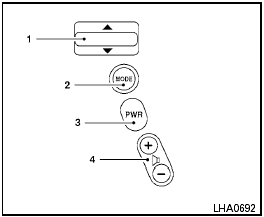
Type A
1. Tuning switch
2. MODE select switch
3. POWER on/off switch
4. Volume control switch
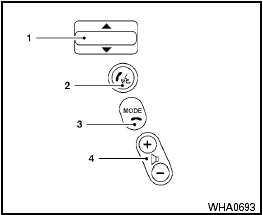
Type B
1. Tuning switch
2. Phone operation switch
3. POWER on and MODE select switch
4. Volume control switch
The audio system can be operated using the controls on the steering wheel.
See also:
Using the panic alarm
Using the panic alarm
If you are near your vehicle and feel threatened,
you may activate the panic alarm to call attention
by pressing and holding the button on the
Intelligent Key for longe ...
Programming HomeLink®
To program your HomeLink® Transceiver to
operate a garage door, gate, or entry door
opener, home or office lighting, you need to be
at the same location as the device. Note:
Garage door opene ...
Training procedure
1. Position the vehicle in a reasonably quiet
outdoor location.
2. Sit in the driver’s seat with the engine
running, the parking brake on, and the
transmission in Park.
3. Push and hold the ...