
NISSAN Intelligent Key™ (if so equipped)
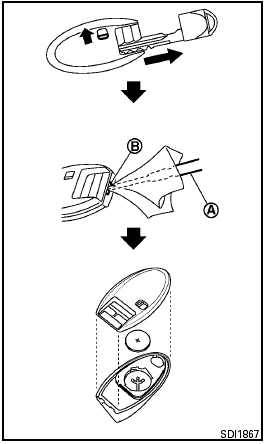
Replace the battery in the Intelligent Key as follows.
1. Remove the mechanical key from the Intelligent Key.
2. Insert a small screwdriver A into the slit B of the corner and twist it to separate the upper part from the lower part. Use a cloth to protect the casing.
3. Replace the battery with a new one.
Recommended battery: CR2025 or equivalent.
● Do not touch the internal circuit and electric terminals as doing so could cause a malfunction.
● Hold the battery by the edges. Holding the battery across the contact points will seriously deplete the storage capacity.
● Make sure that the + side faces the bottom of the case.
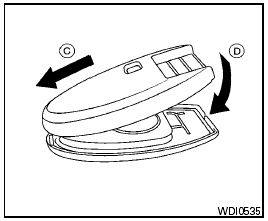
4. Close the lid securely as illustrated C D .
5. Operate the buttons to check the operation.
See a NISSAN dealer if you need assistance for replacement.
FCC Notice:
For USA:
This device complies with Part 15 of the
FCC Rules. Operation is subject to the following
two conditions: (1) This device may
not cause harmful interference, and (2) this
device must accept any interference received,
including interference that may
cause undesired operation. Note: Changes
or modifications not expressly approved by
the party responsible for compliance could
void the user’s authority to operate the
equipment.
For Canada:
This device complies with RSS-210 of Industry
Canada. Operation is subject to the
following two conditions: (1) this device
may not cause interference, and (2) this
device must accept any interference, including
interference that may cause undesired
operation of the device.
See also:
Dual Panel Moonroof (if so equipped)
The moonroof will only operate when the ignition
switch is in the ON position. The automatic
moonroof is operational for about 45 seconds,
even if the ignition switch is placed in the ACC or
...
Getting started
The following procedures will help you get
started using the Bluetooth Hands-Free Phone
System with NISSAN Voice Recognition. For additional
command options, refer to List of voice
commands in ...
USB (Universal Serial Bus) devices (if so equipped)
This system supports various USB memory
sticks, USB hard drives and iPod® players.
There are some USB devices which may not be
supported with this system.
- Make sure that the USB device is con ...