
Exterior and interior lights
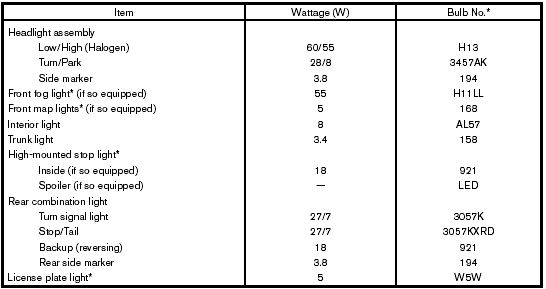
* Always check with the Parts Department at a NISSAN dealer for the latest parts information.
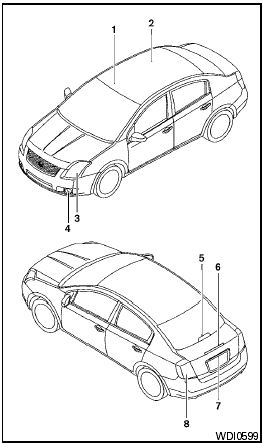
1. Front map lights (if so equipped)
2. Interior light
3. Headlight assembly
4. Front fog light (if so equipped)
5. High-mounted stop light (if so equipped)
6. Spoiler-mounted stop light (if so equipped)
7. License plate light
8. Rear combination light
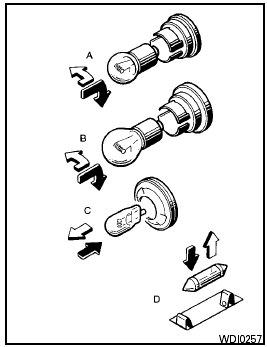
 Indicates
bulb removal
Indicates
bulb removal
 Indicates
bulb replacement
Indicates
bulb replacement
Replacement procedures
All other lights are either type A, B, C or D. When replacing a bulb, first remove the lens and/or cover.
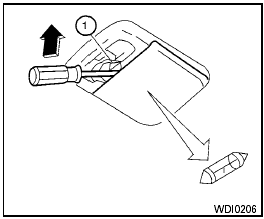
Interior light
Use a cloth 1 to protect the interior light housing.
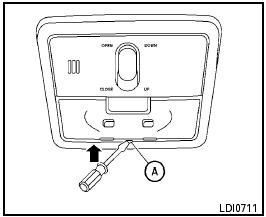
Map light (if so equipped)
Use a cloth A to protect the light housing.
See also:
Supplemental air bag warning labels
Warning labels about the supplemental frontimpact
air bag system are placed in the vehicle as
shown in the illustration. ...
2010 Nissan Cube review
The Cube - which is a "mobile device," not a car, Nissan says, returns for
2010 with a base price of $13,999 (plus $720 freight), which is just $9 more
than the 2009 starting price.
Fo ...
Brakes
If the brakes do not operate properly, have the
brakes checked by a NISSAN dealer.
Self-adjusting brakes
Your vehicle is equipped with self-adjusting
brakes.
The front and rear disc-type brakes ...