
Instrument panel
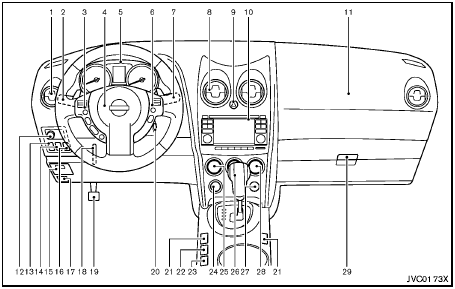
Instrument panel
1. Side ventilator
2. Headlight, fog light* and turn signal switch
3. Steering-wheel-mounted controls (left side)*
— Audio control*
— Bluetooth® Hands-Free Phone System control*
4. Steering wheel
— Horn
— Driver supplemental air bag
— Electric power steering system
5. Meters and gauges
6. Steering-wheel-mounted controls (right side)
— Cruise control switches
7. Wiper and washer switch
8. Center ventilator
9. Hazard warning flasher switch
10. Audio system/Navigation system**
— Clock
— Rear view monitor*
— Around viewTM monitor*
11. Front passenger supplemental air bag
12. Outside remote mirror control switch
13. Headlight aiming control*
14. All-Wheel Drive (AWD) LOCK switch*
15. Fuse box cover
16. Vehicle Dynamic Control (VDC) OFF switch
17. Hood release handle
18. Tilting steering wheel lever
19. Parking brake
20. Ignition switch
21. Heated seat switch*
22. “Camera” Around viewTM monitor display switch*
23. Sport mode switch
24. Power outlet
25. Heater/air conditioner control
26. Selector lever
27. Front passenger air bag status light
28. Rear window and outside mirror* defroster switch
29. Glove box
*: if so equipped
**: See a separate Navigation System Owner’s Manual (if so equipped)
See also:
Styling & Interior
The Rogue's styling had been a bit anonymous, but a few exterior changes —
more creases up front, extra chrome along the doors and grille — add some
character. The silhouette remains the same, ...
Exterior changes
The revised models have been given a new look front and rear to differentiate
them from their predecessors. Changes at the front include a new bonnet, revised
grille and a new bumper assembly. Add ...
Map pockets
Map pockets ...