
Booster seat installation

Do not use the lap/shoulder belt Automatic Locking Retractor (ALR) mode when using a booster seat with the seat belts.
Refer to all Warnings and Cautions in the “Child safety”, “Child restraints” and “Booster seats” sections earlier in this section before installing a child restraint.
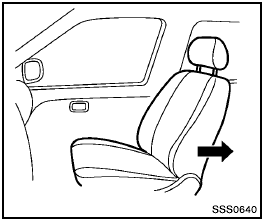
Follow these steps to install a booster seat in the rear seat or in the front passenger seat:
1. If you must install a booster seat in the front seat, move the seat to the rearmost position.
2. Position the booster seat on the seat. Only place it in a forward-facing direction. Always follow the booster seat manufacturer’s instructions.
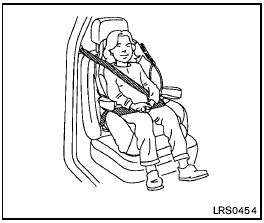
Front passenger position
3. The booster seat should be positioned on the vehicle seat so that it is stable.
If necessary, adjust or remove the head restraint to obtain the correct booster seat fit. If the head restraint is removed, store it in a secure place. Be sure to reinstall the head restraint when the booster seat is removed. See “Head restraints” earlier in this section for head restraint adjustment, removal and installation information.
If the seating position does not have an adjustable head restraint or headrest and it is interfering with the proper booster seat fit, try another seating position or a different booster seat.
4. Position the lap portion of the seat belt low and snug on the child’s hips. Be sure to follow the booster seat manufacturer’s instructions for adjusting the seat belt routing.
5. Pull the shoulder belt portion of the seat belt toward the retractor to take up extra slack.
Be sure the shoulder belt is positioned across the top, middle portion of the child’s shoulder. Be sure to follow the booster seat manufacturer’s instructions for adjusting the seat belt routing.
6. Follow the warnings, cautions and instructions for properly fastening a seat belt shown in “Seat belts” earlier in this section.
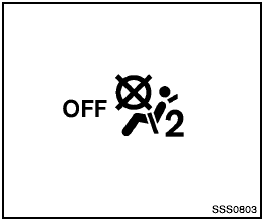
7. If the booster seat is installed in the front
passenger seat, turn the ignition switch to
the ON position. The front passenger air bag
status light  may or may not
illuminate
depending on the size of the child and the
type of booster seat used. See “Front
passenger air bag and status light” later in
this section.
may or may not
illuminate
depending on the size of the child and the
type of booster seat used. See “Front
passenger air bag and status light” later in
this section.
See also:
Rear window defroster switch
For more information about the rear window defroster
switch, see “Rear window and outside
mirror defroster switch” in the “Instruments and
controls” section of this manual. ...
Hood
1 Pull the hood lock release handle located
below the driver’s side instrument panel; the
hood springs up slightly.
2 Lift the lever at the front of the hood with your
fingertips and raise the ...
Selecting the correct oil
It is essential to choose the correct grade,
quality, and viscosity engine oil to ensure
satisfactory engine life and performance, see
“Capacities and recommended fuel/lubricants”
earlier ...