
Headlight beam select
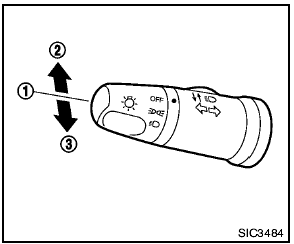
Headlight beam select
1 To select the low beam, put the lever in the neutral position as shown.
2 To select the high beam, push the lever forward
while the switch is in the  position. Pull it back
to select the low beam.
position. Pull it back
to select the low beam.
3 Pulling the lever toward you will flash the headlight high beam even when the headlight switch is in the OFF position.
See also:
NISSAN Voice Recognition Alternate
Command Mode
The Alternate Command Mode enables control
of the Audio, Climate Control and Display systems
as well as additional commands for the
Vehicle Information, Phone and Navigation systems.
With this set ...
Precautions on child restraints
- Failure to follow the warnings and
instructions for proper use and installation
of child restraints could
result in serious injury or death of a
child or other passengers in a
sudden sto ...
Automatic door locks
● All doors lock automatically when the vehicle
speed reaches 15 MPH (24 km/h).
● All doors unlock automatically when the ignition
is placed in the OFF position (models
with Intelli ...