
Heated seats (if so equipped)

Do not use or allow occupants to use the seat heater if you or the occupants cannot monitor elevated seat temperatures or have an inability to feel pain in those body parts in contact with the seat. Use of the seat heater by such people could result in serious injury.

- The battery could run down if the seat heater is operated while the engine is not running.
- Do not use the seat heater for extended periods or when no one is using the seat.
- Do not put anything on the seat which insulates heat, such as a blanket, cushion, seat cover, etc.
Otherwise, the seat may become overheated.
- Do not place anything hard or heavy on the seat or pierce it with a pin or similar object. This may result in damage to the heater.
- Any liquid spilled on the heated seat should be removed immediately with a dry cloth.
- When cleaning the seat, never use gasoline, thinner, or any similar materials.
- If any abnormalities are found or the heated seat does not operate, turn the switch off and have the system checked by a NISSAN dealer.
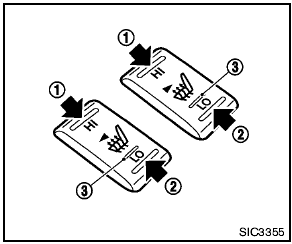
The front seats are warmed by built-in heaters.
The switches located on the center console can be operated independently of each other.
1. Start the engine.
2. Select heat range.
1 For high heat, push the HI (High) side of the switch.
2 For low heat, push the LO (Low) side of the switch.
The indicator light in the switch 3 will illuminate when low or high is selected.
3. To turn off the heater, return the switch to the level position. Make sure the indicator light goes off.
The heater is controlled by a thermostat, automatically turning the heater on and off.
The indicator light will remain on as long as the switch is on.
When the vehicle’s interior is warmed, or before you leave the vehicle, be sure to turn off the switch.
See also:
Replacing
Replacing
Replace the wiper blades if they are worn.
1. Lift the wiper arm away from the windshield.
2 Push the release tab, then move the wiper
blade down the wiper arm to remove.
3 Remove th ...
Standard Mode command list
Category Command:
Phone Command:
Navigation Command:
Information Command:
Audio Command:
...
Ceiling light
Ceiling light
The ceiling light switch has three positions: ON,
DOOR and OFF. ...