
Console box
Console box
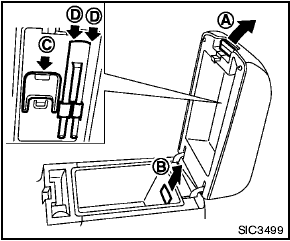
To open the console boxes, push up the knob A and pull up the lid.
To close, push the lid down until latched.
To remove the inner box (if so equipped) for cleaning or storing a large object, pull it up as illustrated B .
The inside of the console box lid is designed to be used as a card holder C and pen holders D .
See also:
Precautions when starting and driving
● Do not leave children or adults who
would normally require the assistance
of others alone in your vehicle. Pets
should also not be left alone. They
could accidentally injure themse ...
Vehicle Dynamic Control (VDC) system
The Vehicle Dynamic Control (VDC) system
uses various sensors to monitor driver inputs
and vehicle motion. Under certain driving conditions,
the VDC system helps to perform the
following funct ...
Vanity mirrors
To access the vanity mirror, pull the sun visor
down and flip open the mirror cover. The vanity
mirror will illuminate when the mirror cover is
open. ...