
Main power window switch (driver’s side)
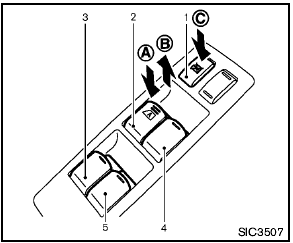
Main power window switch (driver’s side)
1. Window lock button
2. Driver side window
3. Rear left passenger side window
4. Front passenger side window
5. Rear right passenger side window
To open or close the window, push down A or pull up B the switch and hold it. The main switch (driver side switches) will open or close all the windows.
See also:
Aluminum alloy wheels
Wash the wheels regularly with a sponge dampened
in a mild soap solution, especially during
winter months in areas where road salt is used. If
not removed, road salt can discolor the wheels.
...
Exterior
The Pathfinder's styling is considered an evolution of the previous version,
with short overhangs and pronounced fender flares. The rear door handles are
located vertically on the C-pillars, and t ...
Towing safety
Trailer hitch
Choose a proper hitch for your vehicle and trailer.
Make sure the trailer hitch is securely attached to
the vehicle, to help avoid personal injury or property
damage due to sway ca ...