
Automatic operation (if so equipped)
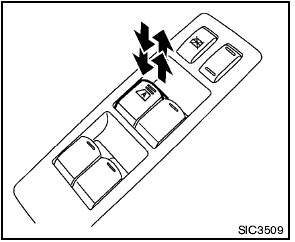
Automatic operation (if so equipped)
The automatic operation is available for the
switch that has an  mark on its surface.
Type A: To fully open or close the window, push down or pull up the switch to the second detent and release it; the switch need not be held. The window will automatically open or close all the way. To stop the window, just push or lift the switch in the opposite direction.
Type B: To fully open the window, push down the switch to the second detent and release it; the switch need not be held. The window will automatically open all the way. To stop the window, just lift the switch. To fully close the window, push and hold the switch.
A light push or pull on the switch will cause the window to open or close until the switch is released.
See also:
How to use the STATUS button
To display the status of the audio, climate control
system and fuel consumption, press the STATUS
button.
The following information will appear when the
STATUS button is pressed multiple times: ...
Engine compartment check locations
QR25DE engine
1. Power steering fluid reservoir (P. 8-14)
2. Engine oil filler cap (P. 8-10)
3. Brake fluid reservoir/Clutch fluid
reservoir (M/T model) (P. 8-15, 8-15)
4. Air cleaner (P. 8-20) ...
Seatback pockets (if so equipped)
Type A
The seatback pockets are located on the back of
the driver’s and passenger’s seats. The pockets
can be used to store maps.
Type B ...