
Door locks/unlocks precaution
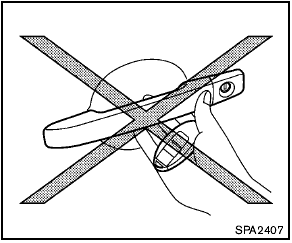
- Do not push the door handle request switch with the Intelligent Key held in your hand as illustrated. The close distance to the door handle will cause the Intelligent Key system to have difficulty recognizing that the Intelligent Key is outside the vehicle.
- After locking with the door handle request switch, verify the doors are securely locked by testing them.
- To prevent the Intelligent Key from being left inside the vehicle, make sure you carry the key with you and then lock the doors.
- Do not pull the door handle before pushing the door handle request switch. The door will be unlocked but will not open. Release the door handle once and pull it again to open the door.
See also:
To protect your vehicle from corrosion
-Wash and wax your vehicle often to keep the
vehicle clean.
- Always check for minor damage to the paint
and repair it as soon as possible.
- Keep drain holes at the bottom of the doors
open t ...
Ceiling light
Ceiling light
The ceiling light switch has three positions: ON,
DOOR and OFF. ...
Battery
If the battery is not fully charged during extremely
cold weather conditions, the battery fluid may
freeze and damage the battery. To maintain maximum
efficiency, the battery should be checked
...