
Backing up on a steep uphill
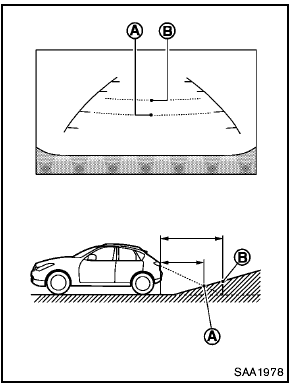
Backing up on a steep uphill
When backing up the vehicle up a hill, the distance guide lines and the vehicle width guide lines are shown closer than the actual distance.
For example, the display shows 3 ft (1.0 m) to the place A , but the actual 3 ft (1.0 m) distance on the hill is the place B . Note that any object on the hill is viewed in the monitor further than it appears.
See also:
F.M.V.S.S./C.M.V.S.S. certification label
The Federal/Canadian Motor Vehicle Safety
Standard (F.M.V.S.S./C.M.V.S.S.) certification label
is affixed as shown. This label contains valuable
vehicle information, such as: Gross Vehicle
W ...
Luggage side box
Luggage side box
To open the luggage side box, pull up the strap. ...
How to adjust the screen (if so equipped)
To set up the RearView Monitor to your
preferred settings, push the SETTING button
while the RearView Monitor screen is displayed.
Each time the SETTING button is pushed, the
next setting item ...