
Backing up on a steep downhill
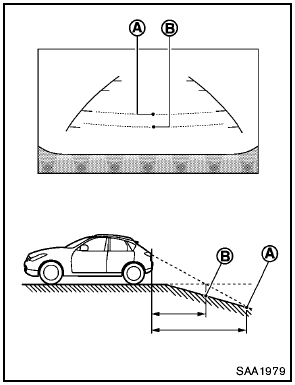
Backing up on a steep downhill
When backing up the vehicle down a hill, the distance guide lines and the vehicle width guide lines are shown further than the actual distance.
For example, the display shows 3 ft (1.0 m) to the place A , but the actual 3 ft (1.0 m) distance on the hill is the place B . Note that any object on the hill is viewed in the monitor closer than it appears.
See also:
Rear window and outside mirror (if so equipped) defroster switch
Type A
To defrost the rear window glass and outside
mirrors (if so equipped), start the engine and
push the rear window defroster switch on. The
rear window defroster indicator light on the
...
Seat belts with pretensioners (front seats)
- The pretensioners cannot be reused
after activation. They must be replaced
together with the retractor
and buckle as a unit.
- If the vehicle becomes involved in a
collision but a prete ...
Under the Hood
The Pathfinder's 4.0-liter V-6 produces 270 horsepower and 291 pounds-feet of
torque. Operating with electronic throttle control, the V-6 features Continuous
Valve Timing Control. All Pathfinders ...