
Moving near a projecting object
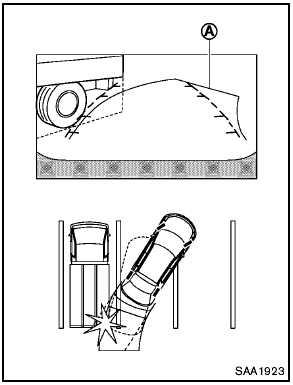
The predicted course lines A do not touch the object in the display. However, the vehicle may hit the object if it projects over the actual moving course.
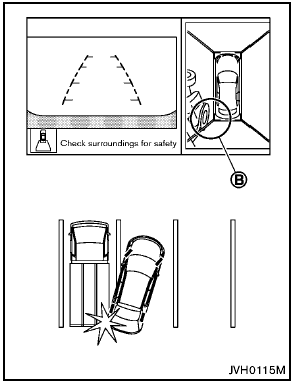
There may be a small distance visible between the vehicle and the object in the birdseye view on the display B .
See also:
Air conditioner button (if so equipped)
Air conditioner button (if so
equipped)
The button is provided only on vehicles equipped
with an air conditioner.
Start the engine, turn the fan control dial to the
desired position and push ...
Locking passengers’ windows
When the lock button C is pushed in, only the
driver side window can be opened or closed.
Push it in again to cancel. ...
Car phone and CB radio
When installing a car phone or a CB radio in
your vehicle, be sure to observe the following
cautions, otherwise the new equipment may
adversely affect the electronic control modules
and electr ...