
FM-AM-SAT radio with Compact Disc (CD) player (Type B)
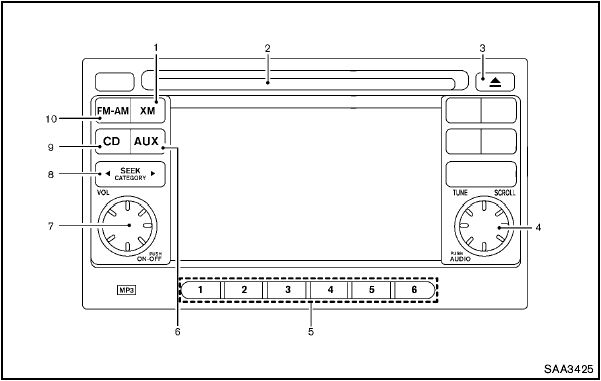
FM-AM-SAT radio with Compact Disc (CD) player (Type
B)
1. XM band select button
2. CD insert slot
3. CD EJECT button
4. TUNE/SCROLL and AUDIO control knob
5. Radio station preset buttons
6. AUX button
7. ON·OFF/VOLUME control knob
8. FF (forward)/REW (rewind) or SEEK/CATEGORY button
9. CD button
10. FM·AM band select button
No satellite radio reception is available unless an
XM Satellite Radio subscription is active.
For all operation precautions, see “Audio operation precautions” earlier in this section.
The satellite radio mode requires an active XM Satellite Radio subscription. The satellite radio is not available in Alaska, Hawaii and Guam.
It may take some time to receive the activation signal after subscribing the XM Satellite Radio.
After receiving the activation signal, an available channel list will be automatically updated in the radio. For XM, place the ignition switch from LOCK to ACC to update the channel list.
See also:
Compact disc with MP3 or WMA (if so equipped)
Terms:
● MP3 — MP3 is short for Moving Pictures
Experts Group Audio Layer 3. MP3 is the
most well-known compressed digital audio
file format. This format allows for near “CD
quality ...
Engine compartment check locations
MR20DE engine
1. Engine coolant reservoir
2. Engine oil filler cap
3. Brake fluid reservoir/Clutch fluid reservoir (M/T
model)
4. Battery
5. Air cleaner
6. Fuse/Fusible link box
7. R ...
Installing top tether strap
Installing top tether strap
First secure the child restraint with the LATCH
system (rear outboard seating positions only) or
the seat belt as applicable.
1. Remove the anchor cover from the an ...