
Passenger compartment
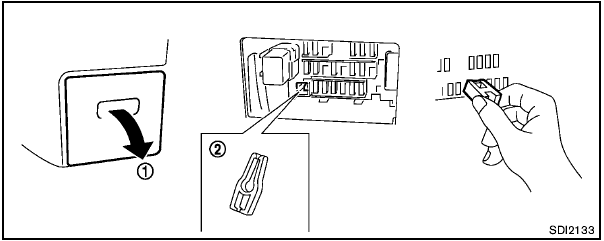

Never use a fuse of a higher or lower amperage rating than that specified on the fuse box cover. This could damage the electrical system or cause a fire.
If any electrical equipment does not operate, check for an open fuse.
1. Be sure the ignition switch and the headlight switch are turned off.
2. Pull to remove the fuse box cover 1 .
3. Remove the fuse with the fuse puller 2 .
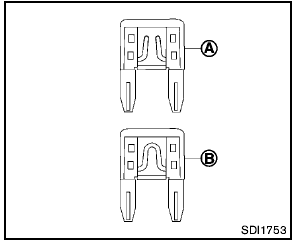
4. If the fuse is open A , replace it with a new fuse B .
5. If a new fuse also opens, have the electrical system checked and repaired by a NISSAN dealer.
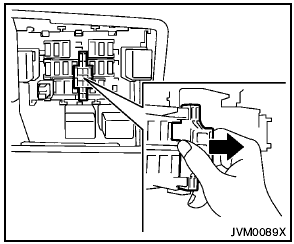
Extended storage switch (if so equipped)
If any electrical equipment does not operate, remove the extended storage switch and check for an open fuse.
NOTE:
If the extended storage switch malfunctions,
or if the fuse is open, it is not
necessary to replace the switch. In this
case, remove the extended storage switch
and replace it with a new fuse of the same
rating.
How to remove the extended storage switch:
1. To remove the extended storage switch, be sure the ignition switch is in the “OFF” or “LOCK” position.
2. Be sure the headlight switch is in the “OFF” position.
3. Remove the fuse box cover.
4. Pinch the storage switch and pull it in the direction illustrated.
See also:
Battery
● Keep the battery surface clean and dry.
Clean the battery with a solution of baking
soda and water.
● Make certain the terminal connections are
clean and securely tightened.
● ...
Top tether anchor point locations
The child restraint top tether strap must be used
when installing the child restraint with the LATCH
lower anchor attachments or seat belts. See “Installing
top tether strap” later in this se ...
Receiving a call
When you hear the ring tone, press the
button on the steering wheel.
Once the call has ended, press the
button
on the steering wheel.
NOTE:
If you do not wish to take the call when you
hear ...