
Compass display (if so equipped)
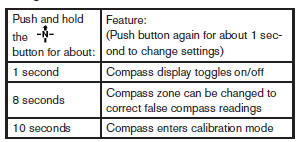
This unit measures terrestrial magnetism and indicates the heading direction of the vehicle.
With the
 ignition placed in the ON position, press
the button as described in the charts below
to activate various features of the automatic
anti-glare rearview mirror.
ignition placed in the ON position, press
the button as described in the charts below
to activate various features of the automatic
anti-glare rearview mirror.
For information about the automatic anti-glare feature, refer to Automatic anti-glare rearview mirror in the Pre-driving checks and adjustments section.
See also:
To protect your vehicle from corrosion
-Wash and wax your vehicle often to keep the
vehicle clean.
- Always check for minor damage to the paint
and repair it as soon as possible.
- Keep drain holes at the bottom of the doors
open t ...
Parking/parking on hills.
WARNING
● Do not stop or park the vehicle over
flammable materials such as dry grass,
waste paper or rags. They may ignite
and cause a fire.
● Safe parking procedures require that
...
Stowing the damaged tire and the tools
1. Securely store the damaged tire, jack and
tools in the storage area.
2. Replace the luggage floor box.
3. Replace the lids on the luggage side boxes.
4. Close the luggage floor board.
5. Repl ...