
Instrument brightness control
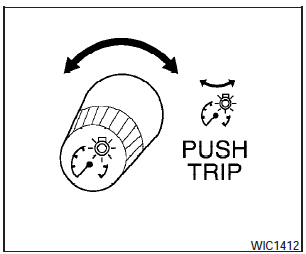
The instrument cluster illuminates when the ignition switch is in the ON position.
The instrument brightness control operates when
the headlight control switch is in the
AUTO,  or
or
 position.
Turn the control left or right to adjust the brightness of the instrument panel lights when driving at night.
The instrument brightness control will not adjust the brightness when the headlights or parking lights are off.
See also:
Compressed Video Files (models with Navigation System)
Explanation of terms:
- DivX DivX refers to the DivXT codec
owned by Div, Inc. used for a lossy compression
of video based on MPEG-4.
- AVI AVI stands for Audio Video Interleave.
It is standard ...
Warning signals
To help prevent the vehicle from moving unexpectedly
by erroneous operation of the Intelligent
Key or to help prevent the vehicle from being
stolen, a chime or buzzer sounds from inside and
outsid ...
Making a call
To make a call, follow the procedure below:
1. Press the button on the
steering
wheel. The “Phone” screen will appear on
the display.
2. Select one of the following options to make a
call: ...