
Turn signal switch
Turn signal
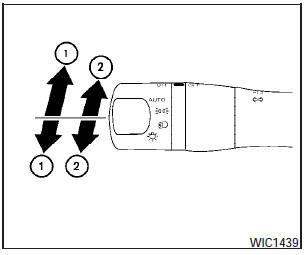
(1) Move the lever up or down to signal the turning direction. When the turn is completed, the turn signals cancel automatically.
Lane change signal
(2)- To signal a lane change, move the lever up or down to the point where the indicator light begins to flash, but the lever does not latch.
See also:
Wheels and tires
Road wheel
1: 2WD models
2: AWD models
3: AWD models (P225/55R18 97V) ...
Engine coolant temperature gauge
The gauge indicates the engine coolant temperature.
The engine coolant temperature is within the
normal range 1 when the gauge needle points
within the zone shown in the illustration.
The engine ...
USB memory operation
Audio main operation:
The USB outlet connector is located in the
center console. Open the lid and connect a USB
memory as illustrated. Then, switch to the USB
memory mode automatically.
If t ...