
Console box
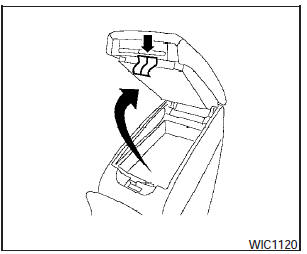
Upper half
Pull up on the drivers side latch to open the upper half of the console box.
The upper half of the console box may be used for storage of cellular phones. An access hole is provided at the front of the upper half of the console box for a phone or iPodT cord routing to the power outlet.
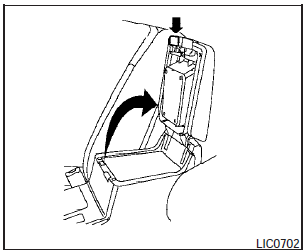
Lower half
Pull up on the lever to open the lower half of the console box. A power outlet is located inside the console box and there is storage for compact discs.
See also:
Automatic door locks
- All doors lock automatically when the vehicle
speed reaches 15 MPH (24 km/h).
- All doors unlock automatically when the
ignition switch is placed in the OFF position.
The automatic unlock func ...
Training phrases
During the SA mode, the system instructs the
trainer to say the following phrases. (The system
will prompt you for each phrase.)
● phonebook transfer entry
● dial three oh four two nin ...
Vehicle security system
The vehicle security system provides visual and
audible alarm signals if someone opens the doors
or trunk lid when the system is armed. It is not,
however, a motion detection type system that
...