
Receiving a call
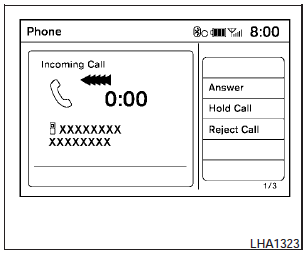
When you hear a phone ring, the display will change to phone mode. To receive a call, follow one of the procedures listed below.
a. Select the Answer key on the display.
b. Press the PHONE button on the instrument panel.
c. Press the phone  button on
the steering
wheel switches.
button on
the steering
wheel switches.
There are some options available when receiving a call. Select one of the following displayed on the screen.
Answer:
Accept an incoming call to talk.
Hold Call:
Put an incoming call on hold.
Reject Call:
Reject an incoming call.
To finish the call, follow one of the procedures listed below:
a. Select the Reject Call key on the display.
b. Press the PHONE button on the instrument panel.
c. Press and hold the phone
button on the
steering wheel switches.
See also:
Air fresheners
Most air fresheners use a solvent that could affect
the vehicle interior. If you use an air freshener,
take the following precautions:
● Hanging-type air fresheners can cause permanent
di ...
Folding rear seat (if so equipped)
Interior trunk access
For models without a rear center console, the
trunk can be accessed from the passenger side
of the rear seat for loading and unloading, as
shown.
(1) Push down on the bu ...
Brakes
If the brakes do not operate properly, have the
brakes checked by a NISSAN dealer. ...