
Components
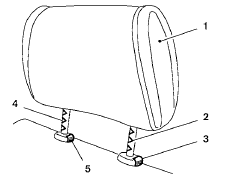
1. Head restraint
2. Adjustment notches
3. Lock knob
4. Stalks
5. Release knob
See also:
Personal Lights
Rear personal lights (sedan only)
To turn the rear personal lights on, press the
switch. To turn them off, press the switch again.
Front map lights ...
Flat towing
Towing your vehicle with all four wheels on the
ground is sometimes called flat towing. This
method is sometimes used when towing a
vehicle behind a recreational vehicle, such as a
motor home. ...
Vehicle information display warnings
and indicators
1. Door and trunk open warning
2. Push warning (CVT models)
3. Low fuel warning
4. Low windshield-washer fluid warning
5. No key warning
6. Parking brake warning
7. Shift P warning (CVT models ...