
Compass display (if so equipped)
This unit measures terrestrial magnetism and indicates
the direction of the vehicle’s heading.
With the ignition switch placed in the ON position,
press the  button as described in
the
chart below to activate various features of the
automatic anti-glare rearview mirror.
button as described in
the
chart below to activate various features of the
automatic anti-glare rearview mirror.
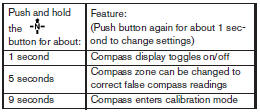
For information about the automatic anti-glare feature, refer to “Automatic anti-glare rearview mirror” in the “Pre-driving checks and adjustments” section.

Press the button for about 1
second when
the ignition switch is placed in the ON position to
toggle the compass display 1 on or off. The
display will indicate the direction of the vehicle’s
heading.
N: North
E: East
S: South
W: West
If the display reads “C”, calibrate the compass by driving the vehicle in three complete circles at less than 5 MPH (8 km/h).
You can also calibrate the compass by driving your vehicle on your everyday route. The compass will be calibrated once it has tracked three complete circles.
See also:
Tire wear and damage
- Tires should be periodically inspected
for wear, cracking, bulging
or objects caught in the
tread. If excessive wear, cracks,
bulging or deep cuts are found,
the tire(s) should be repl ...
Air flow control
Press the air flow control buttons to manually
control air flow and select the air outlet:
— Air flows from center and side
vents.
— Air flows from center and side
vents and foot outlets.
â ...
Freeing a frozen door lock
To prevent a door lock from freezing, apply
deicer through the key hole. If the lock becomes
frozen, heat the key before inserting it into the
key hole or use the remote keyless entry keyfob. ...