
Lighting
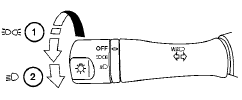
1 When turning the switch to the  position,
the front parking, tail, license plate and
instrument panel lights come on.
position,
the front parking, tail, license plate and
instrument panel lights come on.
2 When turning the switch to the  position,
the headlights come on and all the other
lights remain on.
position,
the headlights come on and all the other
lights remain on.
CAUTION
Use the headlights with the engine running to avoid discharging the vehicle battery.
See also:
NISSAN Voice Recognition Alternate
Command Mode
The Alternate Command Mode enables control
of the Audio, Climate Control and Display systems
as well as additional commands for the
Vehicle Information, Phone and Navigation systems.
With this set ...
Interior
Interior upgrades include white-faced gauges and red-stitched leather on the
steering wheel and manual gearshift knob. The new PRO-4X model has a unique
interior with custom seating. The center st ...
Indicators for maintenance
Indicators for maintenance
1. Engine oil replacement indicator
This indicator appears when the customer
set distance comes for changing the engine
oil. You can set or reset the distance for
cha ...