
Headlight beam select
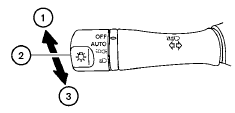
1 To select the high beam function, push the
lever forward. The high beam lights come on
and the  light illuminates.
2 Pull the lever back to select the low beam.
3 Pulling and releasing the lever flashes the headlight high beams on and off.
See also:
Engine compartment check locations
MR20DE engine
1. Engine coolant reservoir
2. Engine oil filler cap
3. Brake fluid reservoir/Clutch fluid reservoir (M/T
model)
4. Battery
5. Air cleaner
6. Fuse/Fusible link box
7. R ...
Continuously Variable Transmission (CVT) (if so
equipped)
● Do not depress the accelerator pedal
while shifting from P (Park) or N (Neutral)
to R (Reverse), D (Drive) or L (Low).
Always depress the brake pedal until
shifting is completed. Fa ...
Connecting iPod®
To connect an iPod® to the vehicle so that the
iPod® can be controlled with the audio system
controls and display screen, use the USB jack
located in the center console. Open the
protectiv ...