
Turn signal switch
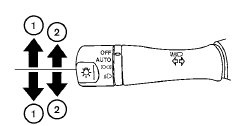
Turn signal
1 Move the lever up or down to signal the turning direction. When the turn is completed, the turn signals cancel automatically.
Lane change signal
2 To signal a lane change, move the lever up or down to the point where the indicator light begins to flash, but the lever does not latch.
See also:
Tire wear and damage
- Tires should be periodically inspected
for wear, cracking, bulging
or objects caught in the
tread. If excessive wear, cracks,
bulging or deep cuts are found,
the tire(s) should be repl ...
Warning for low battery power
When the Intelligent Key battery is low, the Intelligent
Key system warning light (
) will blink
green for about 30 seconds after the ignition
switch is placed in the ON position. This warning ...
Operating range
The Intelligent Key functions can only be used
when the Intelligent Key is within the specified
operating range.
When the Intelligent Key battery is discharged or
strong radio waves are present ne ...