
Keys
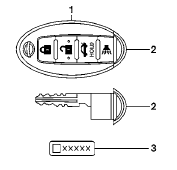
1. Two Intelligent Keys
2. Mechanical keys (inside Intelligent
Keys)
3. Key number plate
See also:
Types of tires
WARNING:
- When changing or replacing tires, be
sure all four tires are of the same type
(i.e., Summer, All Season or Snow) and
construction. A NISSAN dealer may be
able to help you with info ...
How to read the displayed lines
Guiding lines which indicate the vehicle width
and distances to objects with reference to the
vehicle body line (A) are displayed on the monitor.
Distance guide lines:
Indicate distances from ...
FM-AM-SAT(if so equipped) radio with Compact Disc
(CD) player (Type A)
FM-AM-SAT(if so equipped) radio with Compact Disc
(CD) player (Type A)
1. FM·AM band select button
2. CD EJECT button
3. DISP (display) button
4. Color display
5. iPod® MENU button
6. ...