
Locking doors
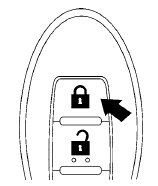
1. Place the ignition switch in the LOCK position.
2. Close all doors.
3. Press the  button on the
Intelligent
Key.
button on the
Intelligent
Key.
4. The hazard warning lights flash twice and
the horn beeps once.
5. All doors will be locked.
CAUTION
After locking the doors using the Intelligent Key, be sure that the doors have been securely locked by operating the door handles.
See also:
Exterior front
1. Engine hood
2. Windshield wiper and washer switch
3. Windshield
4. Moonroof (if so equipped)
5. Power windows (if so equipped)
6. Door locks, keyfob (if so equipped),
NISSAN Intellige ...
2011 Nissan Sentra review
Some cars get all the attention, and the Nissan Sentra isn't one of them. Its
name isn't always uttered in the same sentences as models like the Honda Civic
and Toyota Corolla, but after driving o ...
Towing load/specification
*1: The towing capacity values are calculated
assuming a base vehicle with driver and any
options required to achieve the rating. Additional
passengers, cargo and/or optional equipment
will ...