
Releasing the trunk lid
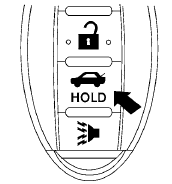
Press the  button for longer than
0.5 seconds
to open the trunk lid. The trunk release
button will not operate when the ignition switch is
in the ON position or when the trunk cancel
switch is in the OFF position. See “Cancel
switch” in this section.
button for longer than
0.5 seconds
to open the trunk lid. The trunk release
button will not operate when the ignition switch is
in the ON position or when the trunk cancel
switch is in the OFF position. See “Cancel
switch” in this section.
See also:
Tachometer
Tachometer
The tachometer indicates engine speed in revolutions
per minute (rpm). Do not rev the engine
into the red zones.
CAUTION:
When engine speed approaches the red
zone, shift to a hi ...
History
In 1993, Nissan discontinued its much-criticized Stanza compact car,
replacing it with the US-made Altima, originally as a compact car. The very
first Altima rolled off the assembly line on June 1 ...
Appealing Controls
Inside, the Juke's inventive design is more impressive than its quality;
similar money will fetch richer cabin materials in other vehicles, but the Juke
does have some tricks up its sleeve. The ce ...