
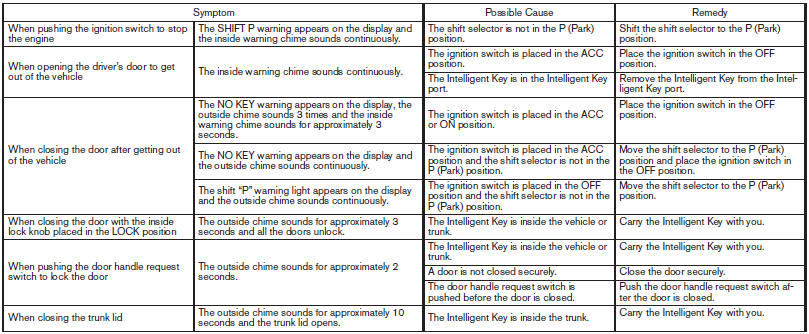
Troubleshooting guide
Verify the location of all Intelligent Keys that are programmed for the vehicle. If another Intelligent Key is in range or inside the vehicle, the vehicle system may respond differently than expected.
See also:
Engine oil and oil filter recommendations
Selecting the correct oil
It is essential to choose the correct grade, quality
and viscosity engine oil to ensure satisfactory
engine life and performance. See Capacities
and recommended fuel ...
Towing recommended by NISSAN
Towing recommended by NISSAN
NISSAN recommends that your vehicle be towed
with the driving (front) wheels off the ground or
place the vehicle on a flat bed truck as illustrated.
CAUTION:
- ...
Horn
To sound the horn, push the center pad area of
the steering wheel.
WARNING:
Do not disassemble the horn. Doing so
could affect proper operation of the
supplemental front air bag system. Tamp ...