
Unlocking doors
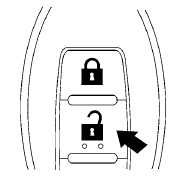
1. Press the  button on the
Intelligent
Key.
button on the
Intelligent
Key.
2. The hazard warning lights flash once.
3. Press the button again within
5 seconds
to unlock all doors.
All doors will be locked automatically unless one
of the following operations is performed within 1
minute after pressing the button:
● Opening any doors.
● Pushing the ignition switch.
The interior light illuminates for 15 seconds when a door is unlocked and the room light switch is in the DOOR position.
The light can be turned off without waiting for 15 seconds by performing one of the following operations:
● Placing the ignition switch in the ON position.
● Locking the doors with the Intelligent Key.
● Switching the room light switch to the OFF
position.
See also:
Giving voice commands
To operate NISSAN Voice Recognition, press
and release the button located on
the
steering wheel. After the tone sounds, speak a
command.
The command given is picked up by the microphone,
and v ...
Tachometer
The tachometer indicates engine speed in revolutions
per minute (rpm). Do not rev engine into
the red zone 1 .
CAUTION
When engine speed approaches the red
zone, shift to a higher gear or reduc ...
Nissan Rogue S Krom™ Edition
The Nissan Rogue Krom™ Edition, which was added to the lineup in late 2009,
is available in both front-wheel and all-wheel drive configurations and in just
three exterior colors - Pearl White, S ...