
Displaying user guide
If you use the NISSAN Voice Recognition system for the first time or you do not know how to operate it, you can display the User Guide for confirmation.
You can confirm how to use voice commands by accessing a simplified User Guide, which contains basic instructions and tutorials for several voice commands.
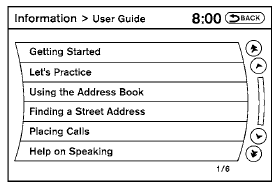
1. Press the INFO button on the instrument panel.
2. Select the “Voice Recognition” key.
NOTE:
You can skip steps 1 and 2 by pressing
the  switch and saying “Help”.
3. Select the “User Guide” key.
4. Select an item.
Available items:
● Getting Started
Describes the basics of how to operate the Voice Recognition system.
● Let’s Practice
Initiates a practice session that demonstrates how to improve voice recognition by the system.
● Using the Address Book
Tutorial for using the Address Book
● Finding a Street Address
Tutorial for entering a destination by street address.
● Placing Calls
Tutorial for making a phone call by voice command operation.
● Help on Speaking
Displays useful tips of speaking for correct command recognition by the system.
See also:
Hood
Hood
1. Pull the hood lock release handle 1 located
below the instrument panel until the hood
springs up slightly.
2. Locate the lever 2 in between the hood and
grille and push the lever sid ...
Blocking wheels
Place suitable blocks 1 at both the front and
back of the wheel diagonally opposite the flat tire
2 to prevent the vehicle from moving when it is
jacked up.
WARNING
Be sure to block the wheel a ...
Outside & In
Against a freshman class of stylish sedans — such as the Ford Fiesta, Hyundai
Accent and Kia Rio — the Versa sinks into the background: anonymous headlights,
sagging shoulders, wimpy wheels. N ...