
NISSAN Intelligent Key™ battery discharge
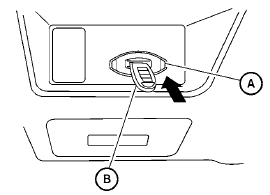
If the battery of the Intelligent Key is almost discharged, the guide light A of the Intelligent Key port blinks and the indicator appears on the vehicle information display. See “Vehicle information display” in the “Instruments and controls” section.
In this case, inserting the Intelligent Key into the port B allows you to start the engine. Make sure the Intelligent Key is placed in the correct direction: The front side faces upward and the key ring side faces downward as illustrated.
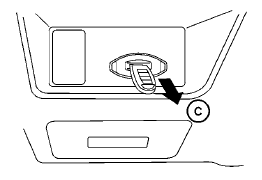
To remove the Intelligent Key from the port, push the ignition switch to the LOCK position and pull the Intelligent Key out of the port C .
NOTE:
The Intelligent Key port does not charge the Intelligent Key battery. If you see the low battery indicator, replace the battery as soon as possible. See “Battery replacement” in the “Maintenance and do-ityourself” section.
CAUTION
● Never place anything except the Intelligent
Key in the Intelligent Key port. Doing
so may cause damage to the
equipment.
● Make sure the Intelligent Key is in the
correct direction when inserting it to
the Intelligent Key port. The engine may
not start if it is in the wrong direction..
● Remove the Intelligent Key from the
Intelligent Key port after the ignition
switch is pushed to the LOCK position.
See also:
Engine compartment
Engine compartment ...
Others settings
Select the “Others” key. Comfort settings, language
and units and Voice Recognition settings
will be displayed.
Comfort settings
Select the “Others” key, then select the “Comfort”
...
Operating tips
● Say a command after the tone. Voice commands
cannot be accepted when the icon
is .
● Commands that are available are always
shown on the display and spoken through
voice menu prompt ...