
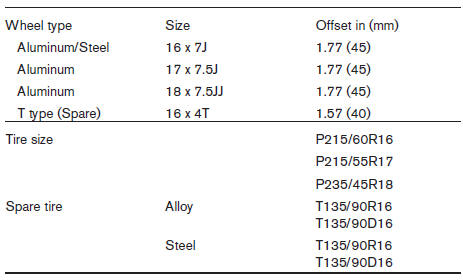
Wheels and tires
Nissan Altima / Nissan Altima Owners Manual / Technical and consumer information / Specifications / Wheels and tires
See also:
Removal
Use the following procedure to remove the adjustable
head restraints.
1. Pull the head restraint up to the highest
position.
2. Push and hold the lock knob and release
knob.
3. Remove the head ...
Fuel-filler door
...
Cleaning
If your windshield is not clear after using the
windshield washer or if a wiper blade chatters
when running, wax or other material may be on
the blade or windshield.
Clean the outside of the wi ...