
Passenger compartment
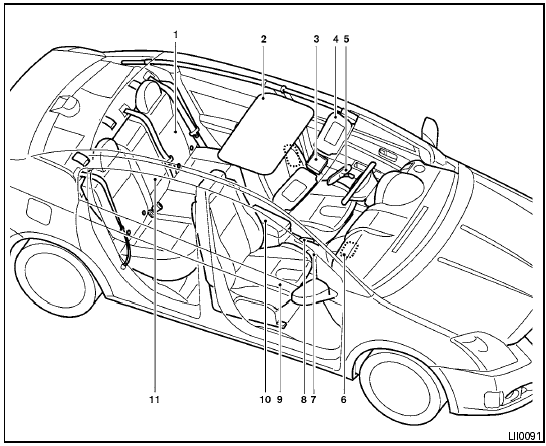
1. Rear seat
2. Moonroof (if so equipped)
3. Interior lights, illuminated entry, moonroof
switch (if so equipped)
4. Sun visors
5. Rearview mirror
6. Glove box
7. Cup holders
8. Parking brake, parking on hills
9. Front seat
10. Front console
11. Rear armrest, cup holders
(if so equipped)
See also:
Wet brakes
When the vehicle is washed or driven through
water, the brakes may get wet. As a result, your
braking distance will be longer and the vehicle
may pull to one side during braking.
To dry the brakes ...
Safety chains
Always use suitable safety chains between your
vehicle and the trailer. The safety chains should
be crossed and should be attached to the hitch,
not to the vehicle bumper or axle. Be sure to leave
...
List of voice commands
When you press and release the
button on
the steering wheel, you can choose from the
commands on the Main Menu. The following
pages describe these commands and the commands
in each sub-menu.
...