
Turn signal switch
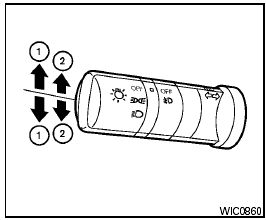
Turn signal switch
Turn signal
1 Move the lever up or down to signal the turning direction. When the turn is completed, the turn signals cancel automatically.
Lane change signal
2 To signal a lane change, move the lever up or down to the point where the indicator light begins to flash, but the lever does not latch.
See also:
Programming HomeLink
1. To begin, press and hold the two outer
HomeLink buttons (to clear the memory)
until the indicator light (1) blinks (after 20
seconds). Release both buttons.
2. Position the end of the hand ...
Type A and Type B
Type A-Without compass
Type B-With compass
The indicator light 2 will illuminate when the
automatic anti-glare feature is operating.
To turn off the automatic anti-glare feature, press:
χ ...
IT'S THE LITTLE THINGS THAT COUNT
Storage Compartments (Puny, Fair, Ample, Galore): Galore
Cargo/Trunk Space (Puny, Fair, Ample, Galore): Galore ...