
Console box
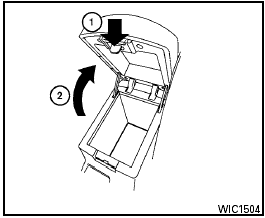
Console box
To open the console box, press in on the lever 1 and raise the lid 2 .
To close, push the lid down until the lock latches.
See also:
Xenon headlights (if so equipped)
WARNING:
HIGH VOLTAGE:
- When xenon headlights are on, they
produce a high voltage. To prevent an
electric shock, never attempt to modify
or disassemble. Always have your xenon
headlights re ...
Air cleaner
MR20DE
The air cleaner filter should not be cleaned and
reused. Replace it according to the maintenance
log shown in the “NISSAN Service and Maintenance
Guide.”
To remove the air cleane ...
A "Casual Lounge" Interior
"The centrepiece of the new Cube's universal appeal is its surprisingly roomy
interior that offers room for five in a lounge-like comfort. It creates a highly
changeable space - for interacti ...