
Mechanical key
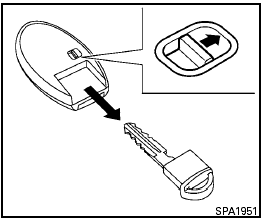
Mechanical key
The Intelligent Key contains the mechanical key, which can be used in case of a discharged battery.
To remove the mechanical key, release the lock knob on the back of the Intelligent Key.
To install the mechanical key, firmly insert it into the Intelligent Key until the lock knob returns to the lock position.
The mechanical key can be used for operation in the same way as an ordinary key.

Always carry the mechanical key installed in the Intelligent Key slot.
See “Doors” in this section and “Storage” in the “Instruments and controls” section of this manual.
See also:
Freeing a frozen door lock
To prevent a door lock from freezing, apply deicer
through the key hole. If the lock becomes
frozen, heat the key before inserting it into the key
hole or use the remote keyless entry keyfob (if ...
Power steering fluid
The fluid level should be checked using the HOT
MAX range on the power steering fluid reservoir
at fluid temperatures of 122° - 176°F (50° -
80°C) or using the COLD MAX range on the
power st ...
Equipment and model lines
Just about the only conventional aspect to Nissan Juke is the model line-up,
which follows Nissan's established Visia, Acenta and Tekna lines. Lists of
standard and optional equipment will be rele ...