
Locking with key
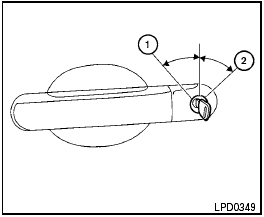
Driver’s side
Manual (if so equipped)
To lock a door, turn the key toward the front of the vehicle 1 . To unlock, turn the key toward the rear 2 .
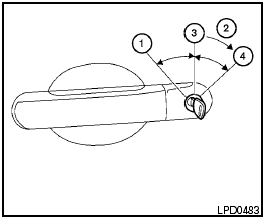
Power (if so equipped)
The power door lock system allows you to lock or unlock all doors at the same time.
Turning the key toward the front 1 of the vehicle locks all doors.
Turning the key one time toward the rear 2 of the vehicle unlocks that door. From that position, returning the key to neutral 3 (where the key can only be removed and inserted) and turning it toward the rear again within 5 seconds unlocks all doors 4 .
See also:
LATCH lower anchor
Failure to follow the warnings and
instructions for proper use and installation
of child restraints could result in
serious injury or death of a child or
other passengers in a sudden stop or ...
Turn signal switch
Turn signal
1 Move the lever up or down to signal the
turning direction. When the turn is completed,
the turn signals cancel automatically.
Lane change signal
2 To signal a lane change, move th ...
Safety
The Sentra received a Good overall rating — the highest possible score — in
the Insurance Institute for Highway Safety's frontal-offset and side-impact
crash tests. It received the next-best s ...