
Locking with power door lock switch
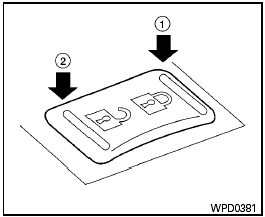
Door lock switch
To lock all the doors without a key, push the door lock switch (driver’s or front passenger’s side) to the lock position 1 . When locking the door this way, be certain not to leave the key inside the vehicle.
To unlock all the doors without a key, push the door lock switch (driver’s or front passenger’s side) to the unlock position 2 .
Lockout protection
When the power door lock switch (driver’s or front passenger’s side) is moved to the lock position with the key in the ignition switch and any door open, all doors will lock and then unlock automatically. This helps to prevent the keys from being accidently locked inside the vehicle.
See also:
Troubleshooting guide
The system should respond correctly to all voice
commands without difficulty. If problems are encountered,
try the following solutions.
Where the solutions are listed by number, try
each solution ...
Tire Pressure Monitoring System (TPMS)
This vehicle is equipped with the Tire Pressure
Monitoring System (TPMS). It monitors tire
pressure of all tires except the spare. When
the low tire pressure warning light is lit and the
CHECK ...
Adjusting the screen (models with Navigation System)
Adjusting the screen (models with Navigation System)
To adjust the quality of the screen, perform the
following.
1. Press the SETUP button.
2. Touch “System”.
3. Touch “Display”.
4. ...