
Door locks/unlocks precaution
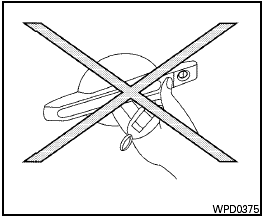
Door locks/unlocks precaution
● Do not push the door handle request switch with the Intelligent Key held in your hand as illustrated. The close distance to the door handle will cause the Intelligent Key system to have difficulty recognizing that the Intelligent Key is outside the vehicle.
● After locking with the door handle request switch, verify the doors are securely locked by testing them.
● To prevent the Intelligent Key from being left inside the vehicle, make sure you carry the Intelligent Key with you and then lock the doors.
● Do not pull the door handle before pushing the door handle request switch. The door will be unlocked but will not open. Release the door handle once and pull it again to open the door.
See also:
Wheels and tires
If you have a flat tire, see “Flat tire” in the
“In case of emergency” section of this
manual. ...
Cargo
Given that all three cars are space-efficient, the Cube's smallest-in-group
exterior size has to hurt something. It does — the cargo space. Nissan says
volume behind the second row totals just 1 ...
LATCH lower anchor location
LATCH lower anchor location
The LATCH lower anchors are located at the rear
of the seat cushion near the seatback. A label is
attached to the seatback to help you locate the
LATCH lower anchors. ...