
Releasing the trunk lid
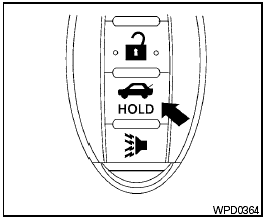
Releasing the trunk lid
Press the  button for longer than
0.5 seconds
to open the trunk lid. The trunk release
button will not operate when the ignition switch is
placed in the ON position.
button for longer than
0.5 seconds
to open the trunk lid. The trunk release
button will not operate when the ignition switch is
placed in the ON position.
See also:
Security indicator light
The security indicator light blinks whenever the
ignition switch is placed in the OFF, LOCK or ACC
position. This function indicates the NISSAN Vehicle
Immobilizer System is operational.
If the ...
Drive belt
1. Power steering fluid pump.
2. Generator.
3. Air conditioner compressor.
4. Crankshaft pulley.
WARNING:
Be sure the ignition switch is in the OFF or
LOCK position before servicing drive bel ...
Air bags, seat belts and child restraints
1. Top tether anchor
2. Rear headrest
3. Rear seat belts
4. Roof-mounted curtain side-impact
supplemental air bag
5. Front seat-mounted side-impact
supplemental air bag
6. Front-seat A ...