
Loose Fuel Cap warning message
Loose Fuel Cap warning message
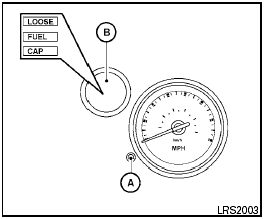
The LOOSE FUEL CAP warning message displays in the odometer when the fuel-filler cap is not tightened correctly after the vehicle has been refueled. It may take a few driving trips for the message to be displayed. To turn off the warning message, perform the following.
1. Remove and install the fuel-filler cap as previously described as soon as possible.
2. Tighten the fuel-filler cap until it clicks.
3. Press the loose fuel cap warning reset button A in the meter for about 1 second to turn off the LOOSE FUEL CAP warning message B after tightening the fuel-filler cap.
See also:
Outside the vehicle
The maintenance items listed here should be
performed from time to time, unless otherwise
specified.
Doors and engine hood Check that the doors
and engine hood operate properly. Also ensure
t ...
OFF position
When the switch is in the OFF position 3 , the
ceiling light will not illuminate, regardless of the
condition. ...
FM/AM/SAT radio with compact disc (CD) player (Type A) (if so equipped)
Type A
1. SCAN button
2. Station select (1 - 6) buttons
3. CD insert slot
4. iPod MENU button
5. CD
eject button
6. TUNE/SCROLL knob/Setting control button
7. SEEK/CAT buttons
8. A ...