
Backing up on a steep uphill
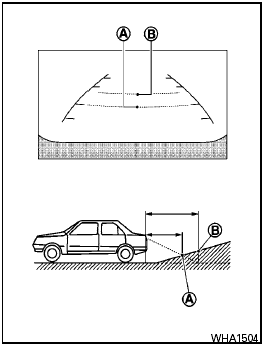
Backing up on a steep uphill
When backing up the vehicle up a hill, the distance guide lines and the vehicle width guide lines are shown closer than the actual distance.
For example, the display shows 3 ft (1.0 m) to the place A , but the actual 3 ft (1.0 m) distance on the hill is the place B . Note that any object on the hill is further than it appears on the monitor.
See also:
Class I hitch
Class I trailer hitch equipment (receiver, ball
mount and hitch ball) can be used to tow trailers
of a maximum weight of 2,000 lb (909 kg).
You may add Class I trailer hitch equipment that
has ...
Brake and clutch (if so equipped) fluid
For further brake and clutch fluid specification
information, refer to “Capacities and recommended
fuel/lubricants” in the “Technical and
consumer information” section of this manual.
...
In-cabin microfilter
The in-cabin microfilter restricts the entry of airborne
dust and pollen particles and reduces
some objectionable outside odors. The filter is
located behind the glove box. Refer to the
NISSAN ...