
FM/AM radio with compact disc (CD) player (Type A) (if so equipped)
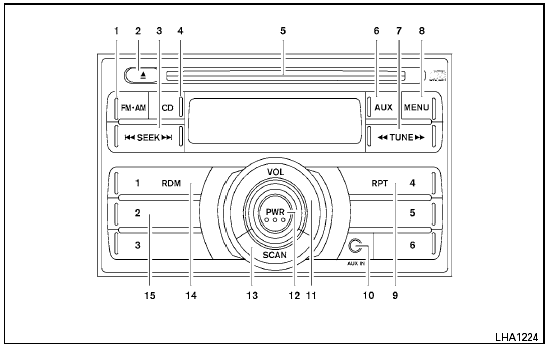
Type A
1. FM-AM button
2.  CD eject button
3. SEEK button
4. CD button
5. CD insert slot
6. AUX button
7. TUNE button
8. MENU button
9. RPT button
10. AUX IN jack
11. VOLUME control knob
12. PWR button
13. SCAN button
14. RDM button
15. Station select (1 - 6) buttons
For all operation precautions, see “Audio operation precautions” in this section.
See also:
Trip computer
To operate the trip computer, use the A
switch.
When the ignition switch is in the ON position,
modes of the trip computer can be selected by
pushing the switch A briefly.
Each time the ...
Storage trays
Storage trays
Do not place sharp objects in the trays to
help prevent injury in an accident or sudden
stop. ...
Controls
Controls
1. Fan control dial
2. Air recirculation button
3. Temperature control dial
4. Air conditioner button
5. Air flow control dial
6. Rear window defroster ...